
Most new roleplay servers pick their police station the same way: whichever PD looked best in a trailer goes in, and nobody asks where it sits on the map. A couple of months later the department is driving four minutes to every call in the north, county players complain that nobody ever patrols their side, and the whole police setup gets rebuilt. It’s a very common story.
The building matters, but where you put your stations, and how many you run, changes how a shift actually plays. This guide is about that part: choosing locations for a city HQ, a sheriff office and any outposts, and making them work together.
The four spots GTA V gives you
The map has four natural places for a station: Mission Row in downtown Los Santos, Davis in the south of the city, Sandy Shores out in Blaine County, and Paleto Bay up north. Each one pulls your police in a different direction.
- Mission Row is central. Response times to most of the city are short, and it’s the station most players already picture when they think of LSPD.
- Davis puts officers right next to the areas a lot of servers use for gang activity. Good if you want cops close to the action, less good if you want a quiet place to book suspects.
- Sandy Shores suits a sheriff department, so people living out in the desert don’t have to wait for a unit to drive up from the city.
- Paleto Bay works as a small outpost. On a lot of servers it’s empty most of the day, so treat it as a second or third station rather than your main one.
One HQ or several stations?
Count your officers before you count buildings. If you usually have three or four cops on at peak, one station is plenty, and a second building just splits them up. Everyone ends up driving between stations to find each other, and the empty one becomes a place people loot or glitch into.
Once you regularly have enough officers to run two patrol areas, a second station starts to pay off. At that point the question becomes which split matches your server: city and county, or north and south of the city. Most servers with a real county population go city and county, because that’s where the long response times are.
Giving the county its own sheriff office
If players live in Sandy Shores, Grapeseed or Paleto, they notice when every call is answered by someone who just drove from downtown. A sheriff office out there changes that. Deputies get their own roster, their own patrol routes and their own identity, which is good roleplay in itself.
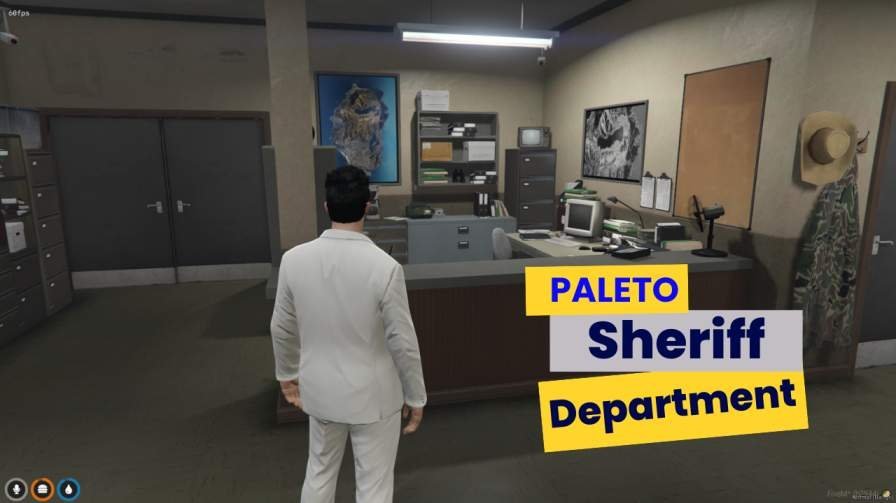
For a smaller server, a sheriff office built for the north of the map, like this sheriff department interior with cells, an armory and a vehicle garage, can cover the county without pulling deputies into city calls. Bigger servers often put the main sheriff base in Sandy Shores and keep Paleto as a quieter substation.
Either way, write down which department handles which area before launch. Arguments over jurisdiction are fun in character and miserable out of character.
Think about where the hospital and court are
Officers don’t just sit at the station. They drive suspects to the hospital, escort people to court, and come back to process evidence. If the station, hospital and courthouse are on opposite edges of the city, a single arrest can eat half a shift.
Mission Row and Pillbox Hill are both downtown, which is part of why so many servers pair them. If you’re also planning the hospital side of your city, look at both decisions together. A county station works best with at least a small clinic nearby, otherwise every injured suspect means a trip back to the city anyway.
Check the layout once you know the location
When you’ve settled where the station goes, then look at the building itself: the path from the sally port to processing, how many cruisers fit, whether cells can be watched from a desk, and whether there’s a briefing room. We cover that checklist in detail in our guide to police department MLOs, so it’s worth reading before you shortlist anything.
When you start comparing, browse a full range of police station MLOs rather than one listing. You quickly see which layouts repeat and which ones actually do something different.
Your scripts follow the buildings
A station is only useful if your MDT, evidence, jail and armory scripts point at it. Most of those scripts read coordinates from a config file, so every extra station means another set of markers, duty points and target zones to move by hand. If you use a job-locked door script, plan which doors need locks before opening, because retrofitting them later always gets missed somewhere. The steps are covered in how PD scripts get wired into a new interior on ESX and QBCore.
Also think about the vanilla building the MLO replaces. Mission Row in particular has been reworked by a lot of creators, and if two resources touch the same spot you get flickering walls or props floating in the lobby. Only run one version of any given station. If you’ve already got that problem, this guide to MLO clipping and IPL conflicts walks through fixing it.
Busy stations need a performance check
A main station gets more traffic than almost anywhere else. Every officer starts their shift there, suspects get dragged in, and people hang around the lobby waiting for court or a lawyer. If the interior is heavy, everyone feels it at once.
Once it’s installed, open the F8 console, type resmon 1 and stand inside the building, then walk outside and compare. Watch for texture loss on lower-end PCs too, which usually shows up as blurry walls or props that pop in late. FiveM only runs on PC, and your player base will have every kind of hardware.
Start with one, expand when the roster grows
The safer plan is to open with one main station, get your department settled, and add a sheriff office or outpost only when you have the people to staff it. When you get there, the rest of the FiveM MLOs catalogue has hospitals, mechanics and shops as well, so you can plan the emergency side of the map in one go.