
FiveM MLO
An MLO adds a real interior to GTA V: walls, rooms, props and collisions that players can walk into instead of a locked door. This is the full list of MLO interiors in the shop, so start here if you are not sure which section a build sits in. You will find police stations, hospitals, mechanic garages, houses, bars, gang hideouts and plenty of one-off locations.
Most of these are standalone map resources. They work the same on ESX, QBCore or QBox, because jobs, doors and targets live in your scripts, not in the map. Location matters more: if two MLOs replace the same building, you get clipping and flickering walls. Our guide to IPL conflicts and clipping shows how to spot that before it happens.
Open a product page to check the location, preview images and what is included. After checkout the files are waiting in your account. New to this? Follow how to install a FiveM MLO: drop the folder into resources, add an ensure line to server.cfg and restart.
Showing 1–18 of 400 resultsSorted by popularity
-

-

-
Sale!
 FiveM Map
Rockford Records MLO
Original price was: $30.00.$14.50Current price is: $14.50. Add to cart -

-

-
Sale!
 FiveM Drugs Map
FiveM Weedshop Paleto MLO
Original price was: $20.00.$15.00Current price is: $15.00. Add to cart -

-

-

-

-

-

-

-
Sale!
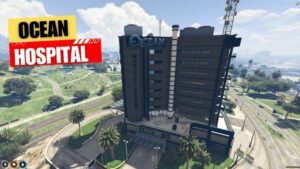 FiveM Hospital & Pillbox MLOs
FiveM Ocean Hospital MLO
Original price was: $65.00.$22.00Current price is: $22.00. Add to cart -
Sale!
 FiveM Map
FiveM Squid Games MLO
Original price was: $20.00.$15.00Current price is: $15.00. Add to cart -

-
Sale!
 FiveM Map
MUM’S Donuts Shop MLO
Original price was: $18.00.$10.00Current price is: $10.00. Add to cart -
Sale!
 FiveM Map
FiveM Hookah Lounge MLO
Original price was: $25.00.$13.00Current price is: $13.00. Add to cart
Buying FiveM MLOs for your server
A good MLO is one of the quickest ways to make a FiveM city feel lived in. Players stop roleplaying in front of locked doors and start working shifts inside a police station, waiting rooms, tuner bays and back offices. This category is the main list of MLO interiors in the FiveM MLOs shop, so use it as your starting point. The sections below explain how to choose an MLO that actually fits your server before you spend money on it.
What you are actually buying
A FiveM MLO is a streamed map resource: models, textures, collisions and the placement data that puts a walkable interior into GTA V. It is not a script. Jobs, doors, targets, stashes and duty points come from the scripts you already run, and you point them at coordinates inside the building. Most MLOs therefore work the same on ESX, QBCore, QBox or a standalone setup. The thing that decides whether an interior works for you is where it sits in the map and what else you already have there.
How to pick the right MLO for your server
Start with the jobs your players log in for
Spend on the places that get used every day. A busy police department, a hospital, a mechanic garage and a few businesses create more roleplay per dollar than a one-off landmark nobody visits. If you are building or rebuilding a city, our FiveM MLO priority stack gives a sensible order for what to buy first.
Check the location before anything else
If two maps edit the same building, they clash: you get flickering walls, missing floors or an interior that will not load. Before you buy, open the product page, note which building or street it replaces, and compare it with what is already in your resources folder. The IPL conflicts guide shows how to spot overlaps and disable the vanilla interior.
ESX, QBCore, QBox or standalone
Because the map streams the same on every framework, "QBCore MLO" or "ESX MLO" usually only tells you which job scripts the seller had in mind. What matters is whether your scripts can use the space: enough room for a duty point, a stash, a boss menu or a garage marker. The ESX, QBCore and QBox guide explains what to wire up after the map is in.
What "optimized" should mean
A resmon reading on an empty server says very little about how an interior behaves with twenty players inside. Look for sensible streaming, working portals so the whole building is not drawn from the street, and a size that suits your players' hardware. Our MLO performance guide covers how to test an interior on a staging server before it goes live.
Shop FiveM MLOs by type
Police and emergency services
Law enforcement roleplay needs cells, a briefing space, parking and somewhere for evidence. Browse police department MLOs such as the Mission Row PD MLO, the Davis Police Department MLO and the Paleto Sheriff Department MLO. Read the Mission Row PD guide before replacing the default station.
Hospitals and EMS
For medical roleplay, compare the options in hospital MLOs. The Pillbox Hospital MLO guide and the Ocean Hospital MLO guide cover location and conflict questions. County servers often add the Blaine County Emergency MLO.
Mechanic shops and car culture
Mechanic jobs keep money moving on a lot of servers. See the mechanic shop MLOs, including the Mirror Park Mechanic MLO (with its buyer's guide), the Airport Mechanic MLO and the Biker Mechanics MLO in Paleto.
Houses and mansions
Housing gives players a reason to earn. The house MLOs range from the Beach House MLO with Patio to the Stark Mansion MLO and the Log Cabin House MLO.
Gangs, drugs and the underground
Criminal roleplay needs hideouts and labs that police can raid. Start with gang MLOs like the Ballas Gang House MLO, or drug maps such as the WeedLab MLO.
Businesses
Civilian jobs fill the quiet hours. Browse restaurant MLOs, bars, shop interiors and niche spots like the pawn shop and smoke shop guides.
Before you add an MLO to cart
- Confirm which building or street it replaces, and that nothing else in your resources edits the same spot.
- Check what the product page says about game build and any required DLC props.
- Decide which scripts will use the space (jobs, doors, stashes, garages) and where their markers go.
- Plan a test on a staging server before you push it live.
- Read the FiveM MLO buyer's checklist if this is your first big map purchase.
What happens after you buy
After checkout, the files are in your FiveM MLOs account. Drop the folder into your resources, add an ensure line to server.cfg and restart. The full steps are in how to install a FiveM MLO. If something does not load, contact support through the contact page or Discord with your server build and a screenshot. Refund requests are handled under our refund policy.
FiveM MLO FAQ
What does MLO mean in FiveM?
MLO is usually expanded as Multi-Level Object. In practice it means a custom interior streamed into GTA V that players can walk into, with its own rooms, props and collisions.
Do FiveM MLOs work on ESX and QBCore?
Usually yes. A map resource streams the same on ESX, QBCore, QBox and standalone servers. You connect your job and door scripts to coordinates inside it. Check each product page for anything framework-specific.
Can I run two MLOs in the same location?
Not safely. Two resources that edit the same building cause clipping, flickering or missing interiors. Pick one, or remove the conflicting resource or default IPL first.
How do I install an MLO after buying?
Download it from your account, place the folder in resources, add ensure plus the folder name to server.cfg, clear your cache and restart. The install guide covers troubleshooting.
What is the difference between an MLO and a YMAP?
An MLO adds an enterable interior. A YMAP places or edits objects in the world, such as props, a fenced lot or a reworked exterior. Many map packs use both. Browse FiveM YMAPs for exterior edits.