
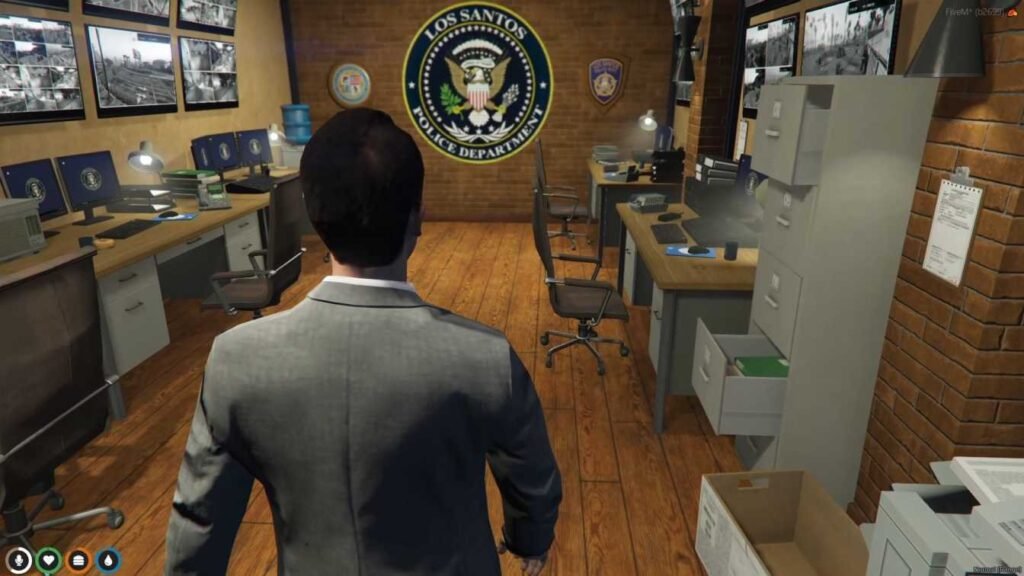
A lot of advice about FiveM MLOs is written for people building a new server. Many owners are in a different spot: the server is already live, the community is active, and the city still runs on a mix of vanilla buildings and whatever was installed in the rush before launch. Upgrading that city is harder than building a new one, because every change happens in front of players who already know where everything is.
This post is about upgrading a live FiveM server: deciding which interiors on a live server to upgrade first, planning the swap so roleplay keeps going, and having a way back if something goes wrong.
Replacement or add-on?
Some MLOs add an interior to a building that was empty or closed in the base game. Others replace a vanilla location, such as a police station, hospital or garage. Replacements are where most upgrade problems come from, because only one can run at a given spot. If you leave the old one running you get doubled walls, floating props and doors that open into concrete. The guide to IPL conflicts covers the technical side and the usual hotspots.
Start with an audit
Before buying anything, make a list of what your city already has. For each important location, note:
- Is it vanilla, a free release, or a paid MLO?
- Which resource folder controls it?
- Which job scripts point at it (duty points, stashes, garages, door locks)?
- How busy is it on a typical evening?
- What do players complain about there?
This list shows you where an upgrade will have the most impact, and it tells you exactly what you will need to reconfigure when you swap a building.
Which interiors to upgrade first
The best upgrade is the one that improves the most roleplay per hour. On a live server, your audit tells you that better than any general list, but it usually points at the buildings on-duty players use every session:
- Police station. Officers start every shift there and process every arrest. A cramped station slows booking for the whole department. Compare PD MLOs, and read our police department MLO guide if you are replacing the downtown station.
- Hospital. If medics treat patients in a parking lot because the interior doesn’t work, this is a quick win. See the hospital category and our notes on the main downtown hospital.
- Mechanic shop. Mechanics spend whole sessions in their shop and the vanilla garages give them little room. See mechanic MLOs.
- Your busiest civilian spot. Upgrading the place players already gather does more than adding a building somewhere quiet.
- Everything else, by complaint count. The locations with the most bug reports or “this place is boring” feedback come next.
A new server would follow a similar order from scratch; our priority stack covers that case.
Swapping a building on a live server
Replacing a building people use every day is a small project. Treat it like one.
1. Check the listing against your audit
Make sure the new interior covers the same vanilla location you plan to replace and doesn’t clash with anything else you run nearby. If you are not sure, ask the seller before paying. The MLO buyer’s checklist lists the questions to ask.
2. Do the swap on a staging copy
Never install a replacement straight onto the live server. On a staging copy with the same resources, disable the old interior first, then install the new one with the seller’s instructions or our MLO install guide. Walk every room and drive around the outside, because exterior conflicts often show up from the street.
3. Move your job points
This is the step owners forget most. Duty points, stashes, armories, garages, door locks, elevators and teleports all use coordinates. When the interior changes, those coordinates often have to move. Go through every script that touches the building and update it. Our guide to MLOs with ESX, QBCore and QBox explains which parts usually need attention.
4. Run a shift with the people who use it
Invite a few players from that job, officers for the station or medics for the hospital, to run a short shift on staging. They will find problems you would never think of, like a door lock that only works from one side or a stash nobody can reach. Ask someone on a modest PC to join too; if they see texture loss or long loading, read the MLO performance guide before going live.
5. Announce, then switch
Tell your community what is changing and when. A short announcement with a few screenshots turns a disruptive change into something players look forward to. Pick a low-traffic time for the switch, restart, and have staff on hand to fix any leftover coordinates.
Have a rollback plan
Even with careful prep, a replacement can misbehave once a full server loads it. Before every swap, keep a copy of the old resource folder and a note of every coordinate you changed in your scripts. If players report serious problems after the switch, such as people falling through floors or a job that cannot go on duty, you can restore the old building and the old coordinates in a single restart while you investigate.
Keep a short change log as well: the date, the building, the resource you removed, the resource you added and the scripts you touched. When something goes wrong three weeks later, that log saves hours of guessing. With several staff members, it also stops two people from changing the same building at the same time.
Common mistakes when upgrading
- Leaving the old interior running. Always disable the old resource before starting the new one.
- Buying two options for the same spot. If you are undecided, try the first one on staging before buying a second.
- Forgetting scripts. A nice station with duty points floating outside the building is worse than the old one.
- Changing everything at once. Swapping five buildings in one restart makes it impossible to tell which one caused a problem.
- Ignoring the people who use it. The players who work in a building every day know what it needs better than anyone.
Pacing the upgrade
Upgrades cost staff time as well as money. A realistic plan is one major replacement at a time, with a week or two between swaps so your team can fix issues and players can settle in. Housing, nightlife and landmarks can follow once the core jobs are solid. When you are ready, you can compare FiveM MLOs by job type, use the 2026 buying guide to narrow it down, or check the FiveM MLOs homepage for new arrivals.
FAQ
Can I replace a vanilla building with an MLO on a live server?
Yes, but do it on a staging copy first. Disable the old interior, install the new one, move all job coordinates and run a shift with players from that job before switching the live server.
Which interior should I upgrade first on a live server?
The one your audit shows is used most by on-duty players. For a lot of servers that is the police station, followed by the hospital and the mechanic shop.
Do I need to change my scripts after replacing an MLO?
Often, yes. Duty points, stashes, door locks, garages and teleports use coordinates. If the new interior has a different layout, those points need to be moved to match.
How often should I upgrade interiors on a live server?
One major replacement at a time is a safe pace. Leave a week or two between swaps so you can fix problems and see how players react before changing the next building.
What if the new building breaks something after the switch?
Roll back. Restore the old resource folder and the old coordinates, restart, and investigate on staging. That is only quick if you kept the old folder and a note of what you changed.